Free to install · 3 months free · GPS-verified · Works offline

PUNCH IN ON SITE.
PRICE THE JOB.

A time clock your crew actually uses, that turns every punch, receipt and work order into what the job really cost — and into an owner-ready invoice. Built inside a property-management company that runs its own crews on it every day.

$7per crew member / month — the whole price list
2 appsone for the crew, one for the office
GPSevery punch stamped to the address
Offlinepunches and photos sync when signal returns

How it works

RUNNING BY LUNCH.

No onboarding call, no per-seat setup, no training day. Add the crew, print or text the codes, and the first punch lands the same morning.

  • Add the company and the crew. Names and roles — that's the setup. Workers don't make accounts or passwords.
  • Crew opens the app and taps their name. Web, iPhone or Android. A short code, and they're on the clock.
  • The office sees it live. Payroll, job costs, materials, work orders and invoices — one dashboard, updating as the day runs.
The ClockCost office dashboard

The punch

ON THE CLOCK, AT THE ADDRESS.

Every clock-in is stamped with where it happened, so a timesheet is a record of who was on which property, not just how many hours.
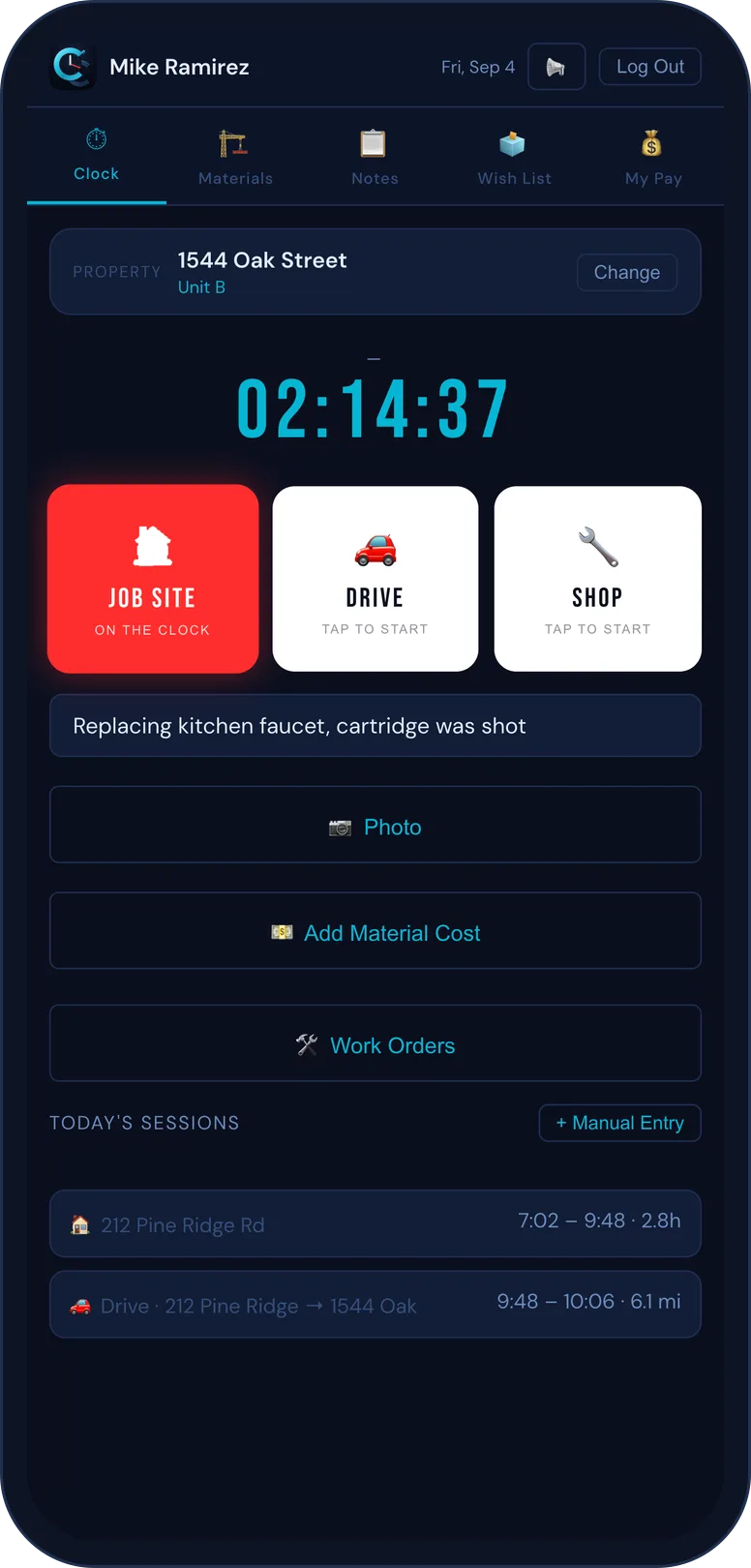
  • GPS-verified clock-in ties the punch to the job site, automatically.
  • Drive time and shop time are their own clocks, so travel and yard time don't disappear into labor.
  • Works offline. Punches, photos and notes queue up and sync the moment signal comes back.
  • Every edit is kept. Fix a timesheet and the old value stays in the history with who changed it and when.
Clocking in on site in ClockCost

Materials

SNAP THE RECEIPT. IT'S FILED.

Materials land on the job while the crew is standing in the aisle — not reconstructed from a shoebox at month-end.

  • Scan a receipt and it's read, itemized and attached to the property it was bought for.
  • Truck stock tracks what's on the van, flags what's run low, and bills it to the job when it's used.
  • Edit anything, and it's logged. Change a price, quantity or which job a material went to — the full before-and-after is kept for an audit.
Scanning a materials receipt in ClockCost

Work orders & repairs

FROM THE CLOCK TO THE INVOICE.

A repair starts as a work order and carries its whole life with it — the hours clocked against it, the materials used, the photos and the notes — straight through to a bill.

  • Open a work order for a repair and the crew clocks time and logs materials right onto it.
  • The next person on site knows. Notes and photos stay with the property, so whoever shows up next picks up where the last one left off.
  • Close it into an invoice. The labor and materials already on the order become the line items — nothing re-typed.
A work order in ClockCost

Job costs & invoicing

WHAT EVERY JOB ACTUALLY COST — AND A BILL TO MATCH.

Labor, materials, receipts and vehicle cost add up per property and per unit as the work happens, then turn into an invoice an owner can read without a phone call.

  • True job cost rolls up hours, burden, materials and drive time by property and by apartment or unit.
  • Owner-ready invoices come out itemized, with deposits applied and nothing padded — bill the whole property or a single unit.
  • Owner statements gather a period's jobs per owner into one clean summary.
  • Clear a backlog honestly. Already billed a job somewhere else? Mark it billed-elsewhere so the numbers stay straight without double-counting income.
  • Payroll, 1099-NEC and QuickBooks exports when it's time to pay people and close the books.
Job costs and pay in ClockCost

The office

IT TELLS YOU WHAT NEEDS YOU.

The dashboard doesn't just show numbers — it flags what's off and takes you straight to it, so nothing sits broken for a week because no one scrolled far enough.

  • Needs-attention, done right. An unsent invoice, a missing rate, a stalled work order, a low material — open it and you land on the exact record, already filtered.
  • Two-step sign-in protects the office side with an authenticator, plus backup codes so you're never locked out.
  • Everything is reversible and logged. Edits keep their history; the Back button always returns you to exactly what you were looking at.
Units and properties in ClockCost

Pricing

$7 PER CREW MEMBER. THAT'S THE WHOLE PRICE LIST.

The app is free to install and workers never pay. The company subscribes per crew member — no base fee, no tiers, no setup charge.

$7per crew member / month
  • Every worker gets the full app — GPS clock-in, drive and shop time, photos, notes
  • Job costing across labor, materials, receipts and vehicle cost, by property and unit
  • Materials and truck stock, receipt scanning, work orders, invoicing and estimating
  • Office dashboard, owner statements, payroll, 1099 and QuickBooks exports
  • 3-user minimum · billed monthly · cancel any time

Ten on the crew is $70 a month. Comparable crew time-tracking runs $120–$140 at that size and does less.

Three months free

Long enough to run real payroll, close real jobs, and see whether the numbers hold up. No card to start.

What you get

The whole product. No premium tier holding a feature back, no per-punch or per-property metering.

What we won't do

Sell your data, charge per punch, or make you call sales to see a price. It's on this page.

karl@southrent.com — tell us your crew size and we'll get you started.

Built by an operator

WE RUN CREWS TOO.

ClockCost is built and run inside Southern Housing, a property-management company managing 90+ properties across South Carolina. Every feature earned its place by fixing something that was costing us money first.

That's why it costs jobs the way an operator thinks about them, bills the way an owner needs to read them, and doesn't ship anything we wouldn't run our own payroll on.

Notes on a property in ClockCost

START WITH TOMORROW'S FIRST PUNCH

Free to install · 3 months free · 3-user minimum · $7 per crew member / month after.